
Spaziou Electrical · Campervan planner
Plan your battery, solar, charging and inverter as one connected system.
Enter your daily consumption and how you actually use your campervan. The tool combines battery, solar panels, charging while driving, inverter, fuses and cables to create a bill of materials.

01 · Starting point
Choose the level closest to your needs.
Your electrical plan
Guided modeCalculate the essentials first. Advanced engineering tools remain available when you need them.Travel profile · Pet
Electrical consumption when travelling with a dog.
Spaziou does not add a fixed load simply because you have a pet. Enter the equipment you will actually use and its operating hours; the planner converts it to Wh/day and adds it to project consumption without counting it twice.
02 · Your inputs
Bill of materials
What you need to build it
Mark what you already own and enter your prices. The list is saved on this device.
| Item | Size / quantity | Product reference | Reason | Already owned | Estimated price | Save |
|---|
03 · Dynamic diagram · Spaziou electrical diagram engine
Your single-line diagram, generated from the calculation.
Select a diagram component to find it in the bill of materials. You can also navigate with Tab and select with Enter.
Planning diagram. Cable sizes are calculated from voltage drop using your inputs. Before installation, check current-carrying capacity, temperature, grouping, actual length, terminals, manufacturer manuals and applicable protection requirements. The photovoltaic side requires checking Voc/Isc and the series/parallel configuration. The 230 V installation requires its own design and checks.
04 · From calculation to installation
An informed approach.
Your components, within your project.
The results and report are free: no email address is required to use them. These suggested products come from your calculated list; always confirm specifications, compatibility and protection requirements before buying.
Calculating materials for your setup…
Explore equipment types
Products from your current list
In the full table you can mark what you own, record prices and read the technical reasoning. Commercial links may earn Spaziou a commission at no extra cost to you.
- Crimping tool and die suitable for the cable size and terminal.
- Multimeter with an appropriate measurement category.
- Cable cutter suitable for the conductor diameter.
- Heat-shrink tubing and a safely operated heat tool.
This is an indicative list. Choose tools and protection devices after checking the installation specifications.
These alerts identify possible checks; they are not approval decisions or installation certificates.
Fixed solar panel installation is generally processed under code 8.52 of Spain's Vehicle Modifications Manual. Other procedures depend on the vehicle and the specific modification. Check the Spanish conversion approval decision tree.
Save or discuss your project
Your SVG diagram and electrical PDF dossier are generated in your browser. No registration or contact details are required.
Identified commercial partnership. Spaziou does not send your personal data automatically: you only share information with Homologatufurgo if you visit and voluntarily complete its request form. The project saved in your browser is not synchronised between devices.
From your layout
From the actual roof to the solar array.
Looking for roof-planner panels in this browser…
SmartSolar configurations use official Victron datasheets. Selection compares battery voltage, cold-weather Voc, operating limit, Isc, charging current and rated PV power. Official datasheet ↗
Solar system
From your chosen panel to a complete solar system.
Generate components and checks from the PV array, MPPT and actual cable lengths entered.
Items marked “Check” require the manufacturer's datasheet, applicable regulations or installation data that must not be inferred automatically.
Automatic MPPT selection
Test your solar array against 8 real controllers.
Models meeting all the official limits entered in the library are ranked first.
Two solar arrays
Build Array A and Array B from the physical roof layout.
If 2D Layout has valid A/B zones, it uses exactly those panels. Without zones, you can still use the A+B simulation.
Solar cable routes
Actual 2D Layout lengths → cable size and voltage drop.
Uses the orthogonal X/Y/Z route saved in 2D Layout, including the cable allowance. It does not include the internal leads between panels.
Electrical equipment positions
Equipment positions become part of the calculation.
Import physical routes for the DC-DC charger, inverter, fuse box, busbars and mains charger. DC cable sizes are calculated from voltage drop; the AC side requires a specific design.
Cable optimisation
Reduce copper use before completing the installation.
Optimisation runs in 2D Layout because it depends on X/Y/Z positions. Its results are shown here and the installation is recalculated after applying them.
Electrical architecture comparison
Compare complete architectures before buying equipment.
12 V vs 24 V · one MPPT vs two · equivalent currents for a given power · copper, losses and complexity. This is a design comparison, not hardware compatibility certification.
04 · Visual reference
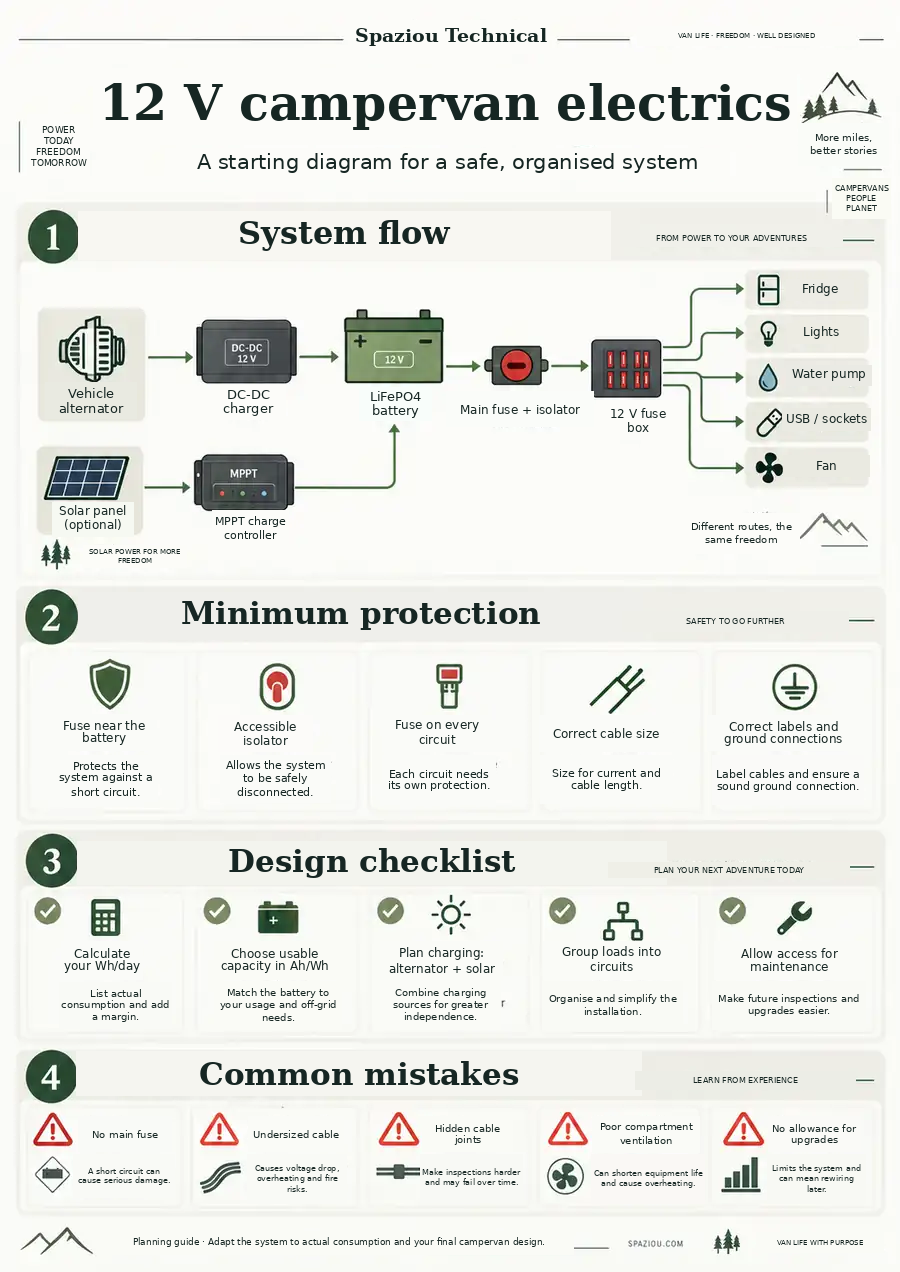
A general guide to understanding the whole system.
The dynamic diagram above adapts to your inputs. This infographic is a visual reference for understanding a typical 12 V campervan installation.
05 · What it checks
Battery
Calculates rated Wh and Ah using time off-grid, usable capacity, losses and margin.
Solar
Compares your panels' estimated production with daily consumption and sizes the controller.
Charging while driving
Estimates recovered energy from charging current and driving hours.
Inverter
Converts 230 V power to approximate battery current and checks the BMS, fuse and cable.
Cable
Calculates a minimum cable size from voltage drop; you must also check the cable's current-carrying capacity afterwards.
Daily balance
Adds solar and driving contributions and warns if planned charging does not cover daily consumption.